AI meeting notes for iPhone & Apple Watch

Your meetings, remembered and followed through — in person or online, even offline.

Record in the room or send a notetaker to Zoom, Teams and Google Meet. Get notes, tasks and answers you can act on, and share them with your team.

Coming soon to the App Store · Free to start

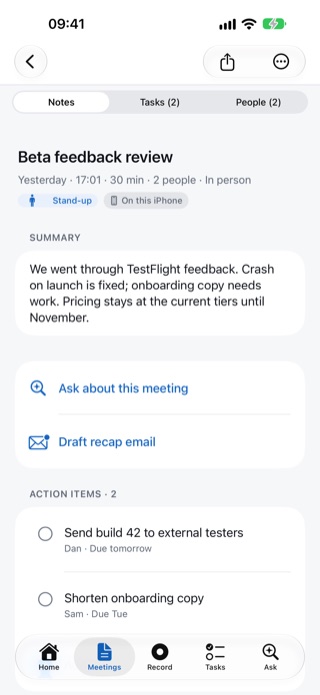
Meeting notes for Beta feedback review: a summary, Ask about this meeting, Draft recap email and action items for Dan and Sam.
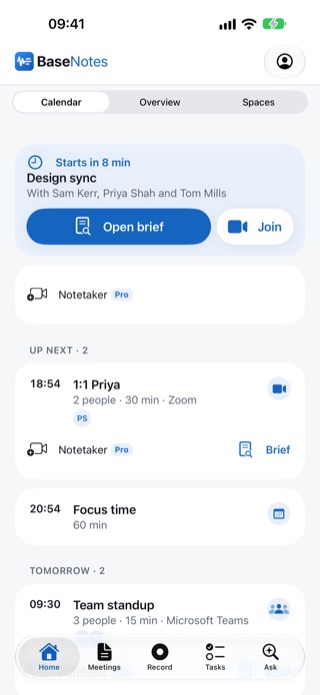
BaseNotes Home: a Design sync meeting starts in 8 minutes, with Open brief and Join buttons and the day's upcoming meetings.
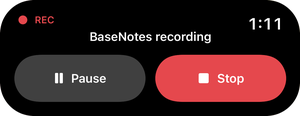
Dynamic Island showing a BaseNotes recording at 1:11 with Pause and Stop buttons.

Works where you meet

  • In the room
  • Zoom
  • Microsoft Teams
  • Google Meet
  • Voice notes

How it works

From conversation to done, in three steps

No setup, no bot required. Tap record, and BaseNotes does the rest.

  1. 01

    Capture

    Record in the room, or send the notetaker to your online call.

    • In-person meetings and voice notes
    • Start and stop from your Apple Watch or Siri
    • Notetaker for Zoom, Teams and Meet (Pro)
  2. 02

    Understand

    Your transcript becomes notes you can trust, with speaker labels on Pro.

    • Summary, key points and decisions
    • Tasks with owners and due dates
    • Answers backed by verbatim quotes
  3. 03

    Follow through

    Everything that was agreed ends up where you'll act on it.

    • Tasks synced to Apple Reminders
    • Follow-up meetings added to your calendar
    • Recap emails and pre-meeting briefs

Features

Built for the meeting, and everything after it

Home & briefs

Walk into every meeting prepared

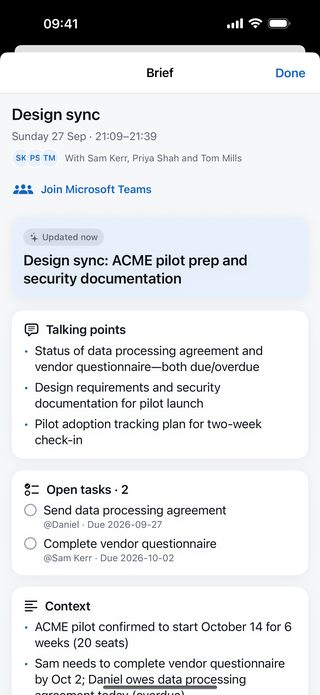
BaseNotes opens on what's next. Every meeting in your calendar, from your iPhone or Microsoft 365, gets a brief: what you discussed last time with the same people, what was decided and what's still open.

  • A “Starts in 8 min” card with one-tap Join
  • Briefs built from past meetings with the same people and client
  • Connect Microsoft 365 for Teams and Outlook meetings, with who's invited
  • A reminder a few minutes before it starts
A pre-meeting brief for Design sync with attendees, a Join Microsoft Teams link and suggested talking points.

Ask

Ask your meetings anything

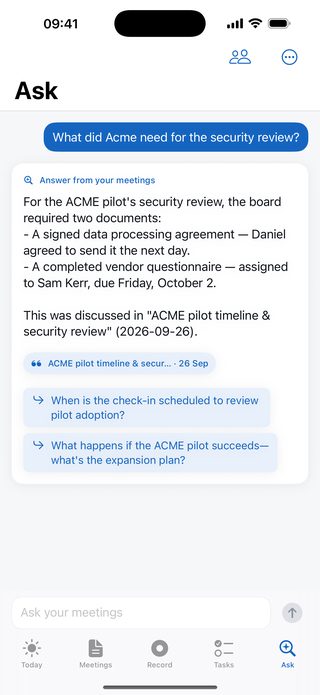
Ask in plain English and get an answer drawn only from your own meetings, with verbatim quotes you can check against the transcript.

  • Every answer cites the meeting it came from
  • Ask across everything, or about one meeting
  • Answers in seconds, even across months of meetings
The Ask screen answering “What did Acme need for the security review?” from a client call, with a citation to that meeting and suggested follow-up questions.

Offline-first

Works on a plane

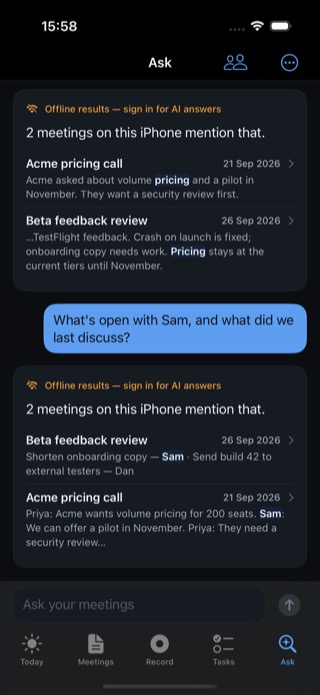
Record, transcribe on your iPhone, search and prepare without a connection. Everything syncs when you're back online.

  • On-device transcription
  • Offline search and briefs from notes on your iPhone
  • Meetings sync automatically when you reconnect
Offline results in dark mode answering “What's open with Sam, and what did we last discuss?” from meetings on the iPhone.

Tasks

Tasks that don't get lost

Action items come out of every meeting with owners and due dates. Add your own, hand them to a colleague, send them to Apple Reminders and tick them off anywhere.

  • Owners and due dates pulled out automatically
  • Two-way completion with a “BaseNotes” list in Reminders
  • One tap: all, mine, given to me or delegated
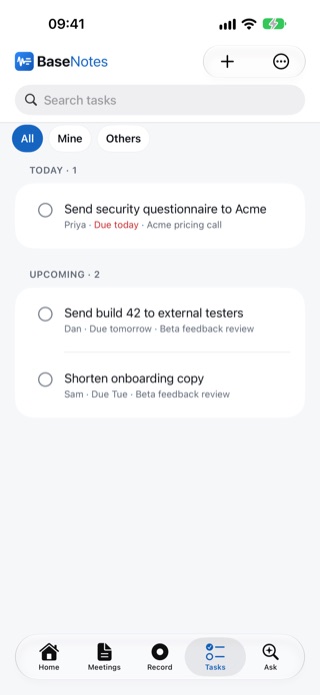
The Tasks list grouped by Today and Upcoming, each task with its owner, due date and meeting on one line.

Spaces Every plan

Bring your team in

Connect with the people you meet, message them one to one, or make a Space for a team, client or project. Share meeting notes, talk them through and hand off the tasks, so everyone knows what was agreed and who's doing what.

  • Team Spaces and one-to-one messages, with notifications
  • Invite anyone by email; they can accept with a 6-digit code from any device
  • Once connected, tasks and Spaces reach them in one tap
  • See who can read each meeting, and stop sharing any time

Invite colleagues and you both get 5 more AI meetings a month once they record their first meeting.

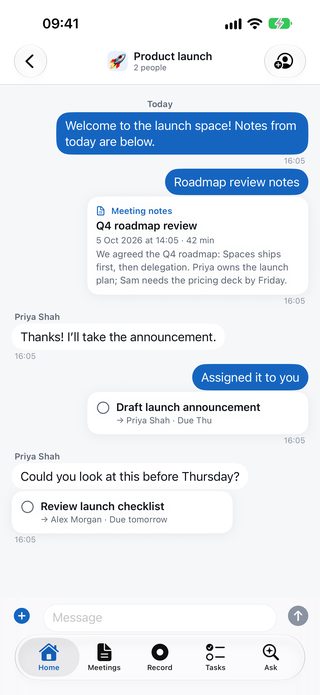
A Product launch Space: a shared Q4 roadmap review card, a short chat with Priya Shah, and a Draft launch announcement task assigned to her.

People

Know who you're meeting

Everyone from your meetings and calendar in one place, grouped by company. Tap anyone in a meeting to see what you've discussed, what's open with them and when you meet next.

  • People grouped by company, and who's already on BaseNotes
  • Past and upcoming meetings and open tasks for each person
  • Company info from their website, and LinkedIn search (Pro)
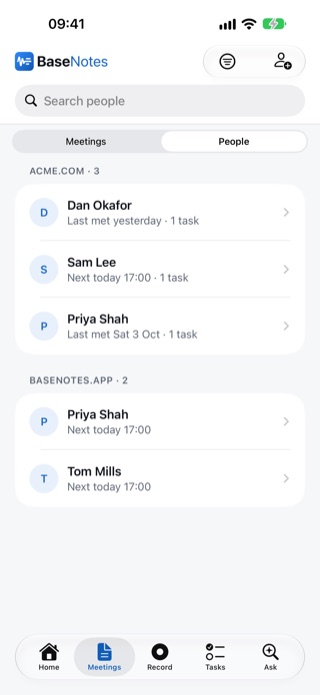
The People list grouped by company, with Connected and On BaseNotes badges.

Notetaker Pro

Can't be there? Send a notetaker

Send the BaseNotes Notetaker to Zoom, Microsoft Teams or Google Meet. It joins by name, tells everyone it's recording, and your notes arrive after the call.

  • Join now (even once the meeting has started), schedule it, or auto-join from your calendar
  • Posts a message in the meeting chat so everyone knows
  • Ask it to leave at any time

Optional and included in Pro, for up to 15 hours of calls a month. Please get any consent the law requires before recording.

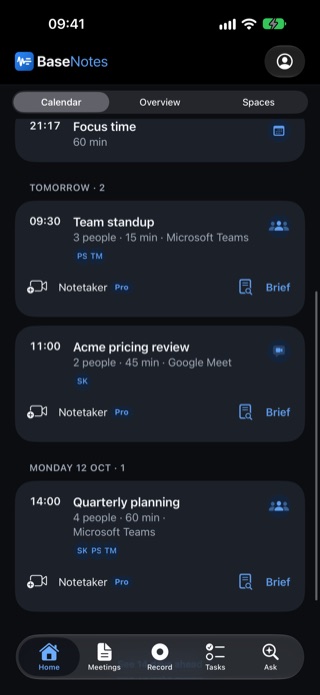
Upcoming meetings in dark mode, each with a Notetaker control and a Brief button.

Apple Watch, Live Activity & Siri

Record from anywhere

Start and stop recordings from your Apple Watch, control them from the Lock Screen and Dynamic Island, or just ask Siri.

  • Keeps recording with your iPhone locked
  • Pause and stop from the Live Activity
  • Siri & Shortcuts to start and stop
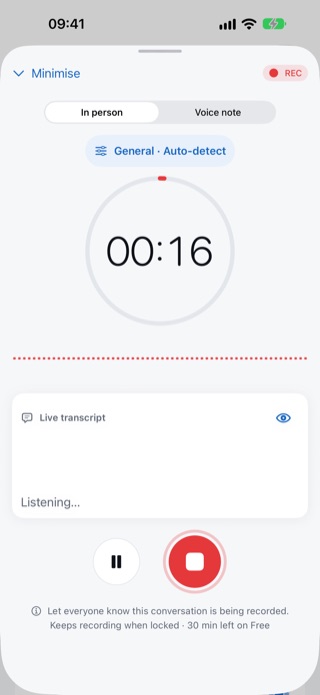
Recording in person: a timer at 16 seconds, a live transcript panel, and pause and stop buttons.
Dynamic Island with Pause and Stop controls for a BaseNotes recording.

Share & export

Follow up in one tap

Draft a recap email in your tone, share a read-only link that expires, or export your notes as text, or as PDF on Plus and Pro.

  • Recap drafts you edit and send from Mail
  • Share links expire after 1–90 days and can be revoked
  • Follow-up meetings added only when you confirm
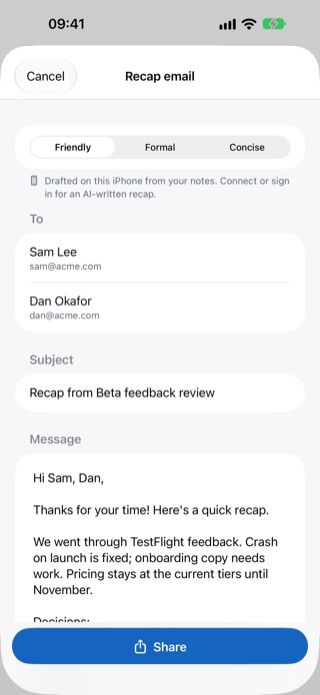
A recap email drafted on the iPhone, with Friendly, Formal and Concise tones, recipients and a Share button.

Privacy & trust

Your meetings are yours

Meetings are sensitive. We built BaseNotes to handle them with care, and we explain everything in plain English.

On-device transcription

On Free and Plus, recordings are transcribed on your iPhone, not in the cloud. Without an account, everything stays on your iPhone.

No AI training on your content

We don't train AI models on your meetings, and our AI providers don't either under our agreements with them.

Audio on your terms

On Free, audio stays on your iPhone. On Plus and Pro, cloud copies are deleted 30 days after processing unless you choose otherwise, or sooner when you delete a meeting.

Export or delete anytime

Export notes as text (or PDF on Plus and Pro), and delete a meeting or your whole account from Settings.

UK/EU GDPR-minded

Built with UK and EU data protection in mind, with safeguards for international transfers.

No ads, no tracking

No advertising, no third-party analytics, and we never sell your data.

Pricing

Start free. Upgrade when you need more.

Billed through the App Store. Cancel any time in your Apple ID settings.

Free

Try AI notes on your next few meetings.

£0

No subscription needed

  • 3 AI meetings a month
  • Recordings up to 30 minutes
  • 30 Ask questions a month
  • Transcribed on your iPhone
  • Standard AI model
  • Spaces & task sharing with your team
Get started free

Plus

For people with a meeting-heavy week.

£6.99/month

Billed monthly

  • 50 AI meetings a month
  • Recordings up to 2 hours
  • 150 Ask questions a month
  • Transcribed on your iPhone
  • Advanced AI model
  • PDF export & email summaries
  • Audio backup, kept as long as you like
Get Plus

Prices shown in GBP and USD; the App Store shows the price for your country. The 7-day Pro trial is for new subscribers (one per Apple ID). Trials become paid subscriptions, and subscriptions renew automatically, unless cancelled at least 24 hours before the end of the trial or period. Refunds are handled by Apple. Pro's 15 hours of cloud transcription include notetaker calls; after that, recordings are transcribed on your iPhone. Spaces, team chat and task sharing are included on every plan. *Unlimited is subject to fair use.

FAQ

Questions, answered

Do I need to invite a bot to my meetings?

No. BaseNotes records with your iPhone, in the room or alongside a call on speaker. The notetaker for Zoom, Teams and Google Meet is optional and part of Pro.

Is it legal to record meetings?

Recording laws vary. In the UK and EU you should tell people and have a good reason, and some US states require everyone's consent. You're responsible for getting any consent the law requires. The notetaker announces itself in the meeting chat, and the app reminds you to tell people before recording in person.

Does BaseNotes work offline?

Yes. You can record, transcribe on your iPhone and search your notes without a connection. AI summaries, cloud answers and Pro's cloud transcription run when you're back online, and your meetings sync automatically.

Where are my recordings transcribed?

On Free and Plus, and without an account, recordings are transcribed on your iPhone, so the audio isn't sent anywhere to be transcribed. Pro adds cloud transcription with speaker labels for up to 15 hours a month, including notetaker calls; after that, Pro recordings are transcribed on your iPhone too.

Which AI models do you use?

Pro uses Anthropic's Claude, our best model for notes and answers. Free and Plus use open models (Plus gets a more capable one than Free), run by providers in the US and EU that don't keep your content. No provider may train on your meetings.

What happens to my recordings?

On Free, audio stays on your iPhone and only the transcript is sent to us for AI notes. On Plus and Pro, audio is backed up to our servers and deleted 30 days after processing, unless you choose a shorter time or to keep it in Settings → Privacy & data. Transcripts and notes stay until you delete them or your account. We never use your content to train AI models. The privacy policy has the details.

Can I share notes with my team?

Yes. Connect with colleagues from People, message them one to one, or make a Space for a team or project and invite people by email. Invites include a 6-digit code, so they can accept from any device. Share meeting notes and tasks into it, chat about them and assign tasks to each other. Spaces are free on every plan. You choose what to share, and you can stop sharing a meeting or remove someone at any time.

Does it work with Microsoft 365 and Outlook?

Yes. Sign in with Microsoft or tap Connect Microsoft 365 to see your Teams and Outlook meetings, with who's invited, alongside the calendars on your iPhone. The notetaker joins Teams calls on Pro.

How does Invite & earn work?

Invite colleagues from Home or Settings. When someone joins with your invite or link and records their first meeting, you both get 5 more AI meetings every month on Free and Plus, for up to 10 people. Extra accounts of your own don't count.

Which devices does it work on?

iPhone (iOS 18 or later) today, and you can start and stop recordings from your Apple Watch. Web and Mac apps are on our roadmap.

How do subscriptions and refunds work?

Plus and Pro are billed through the App Store and renew automatically. New subscribers can try Pro free for 7 days, and aren't charged if they cancel at least 24 hours before the trial ends. Cancel any time in your iPhone's Settings under your Apple ID. Refunds are handled by Apple at reportaproblem.apple.com.

How do I delete my data?

Delete any meeting from the Meetings list, or your whole account in Settings → Reset → Delete account. Account data is removed from our systems immediately, and backups roll off within 30 days.
More answers on the support page.

Never lose track of a meeting again

Record your next meeting, get the notes and tasks, and follow through. Free to start.

Coming soon to the App Store for iPhone and Apple Watch.